
Free Price Tag & Barcode Label Printer App for Android
Label Storm turns your phone into a label maker for your shop. Print price tags, MRP stickers, barcode labels, QR codes and jewellery tags on the thermal label printer you already own, over Bluetooth or USB. No PC, no sign-up, no expensive label software.
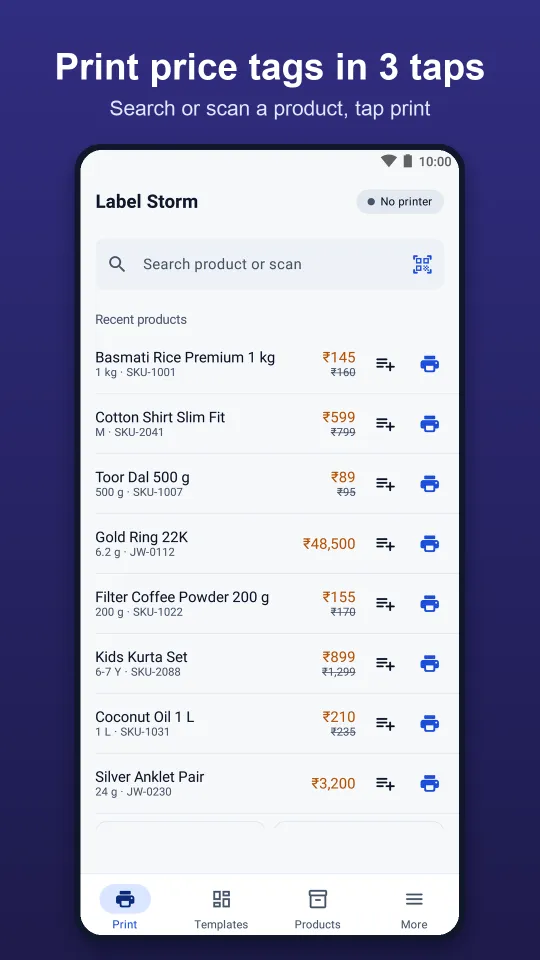
Print Price Tags From Your Phone in 3 Taps
Search or scan a product, pick a label and print. Here is the full setup the first time you use it.
Connect your label printer
Install Label Storm, then connect your thermal label printer over Bluetooth, Bluetooth Low Energy or USB (OTG cable). Set the label size, gap and print darkness to match your roll.
Add your products
Type products in, scan their barcode, or import your whole product list from a CSV file exported from Excel or Google Sheets.
Pick a label
Choose a ready-made price tag, MRP label, barcode sticker or jewellery tag, or design your own with the drag-and-drop designer.
Preview and print
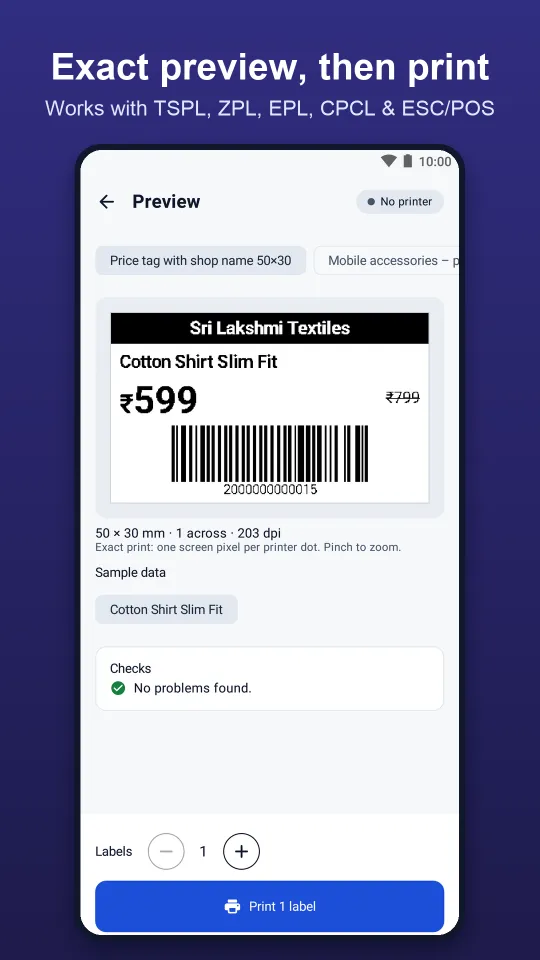
Check the exact preview, set how many labels you need, and print one label or hundreds in a single job.
A Label for Every Shop
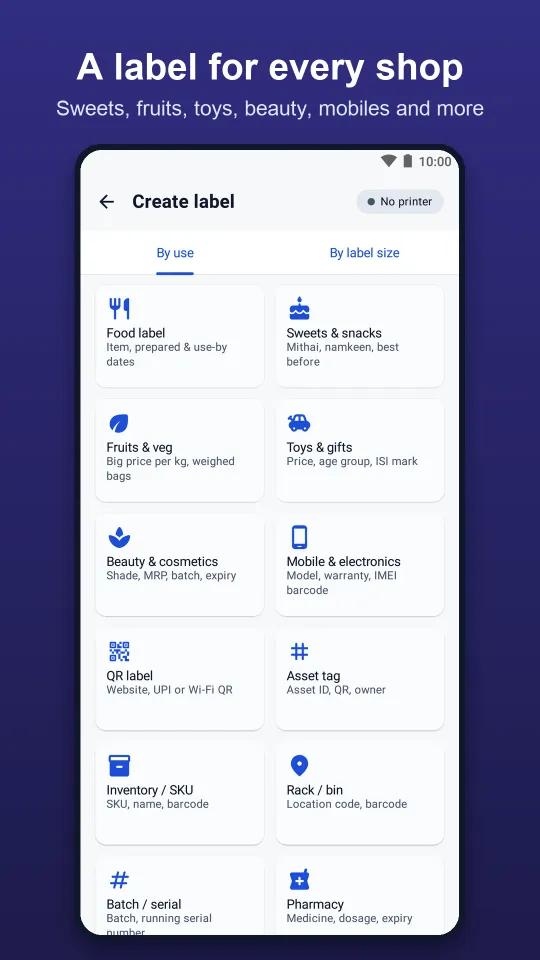
Start from a ready-made layout built for Indian retail, or customise it in the designer. Every label type below is included free.
Price tag stickers
Retail price tags with MRP, offer price, size and barcode for any shop.
MRP labels
Packaged goods labels with net quantity, mfg and expiry dates, batch and FSSAI number.
Barcode stickers
Code 128, EAN-13 and more for billing, stock and inventory (SKU) labels.
QR code & UPI QR
QR code stickers for websites, Wi-Fi and UPI payment at the counter.
Jewellery tags
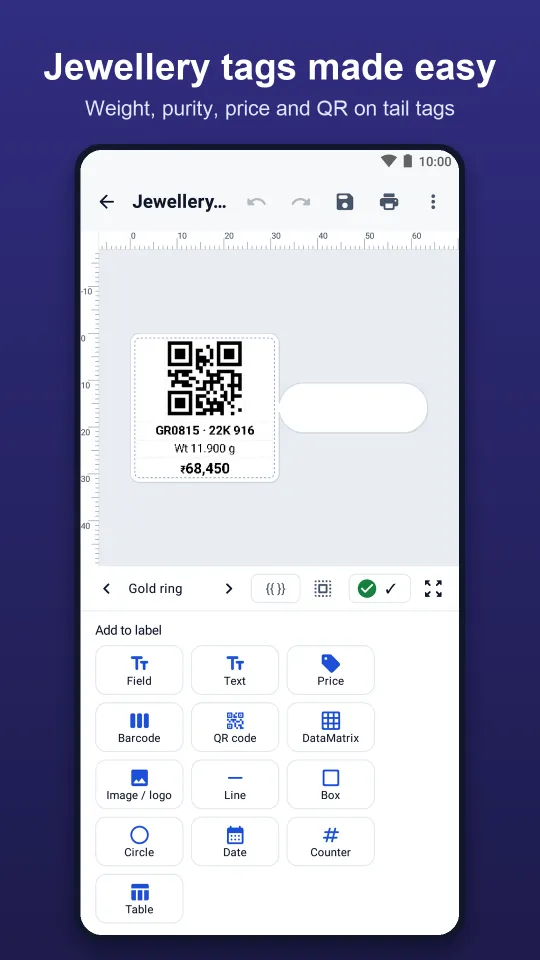
Tail tags with gross and net weight, 22K / 916 purity, price and QR.
Sweets & bakery
Box labels with made-on and best-before dates, and ₹/kg tray cards.
Fruits & vegetables
Price cards and weighed-bag labels for fresh produce.
Garment hang tags
Clothing and footwear tags with size, colour, price and barcode.
Toys & gifts
Toy tags with age group, ISI mark and safety warning.
Cosmetics & pharmacy
Shade, batch and expiry labels; medicine and dosage labels.
Mobile accessories
Warranty labels and IMEI barcode stickers.
Kirana & home products
Repacked goods, pickles and masala with veg mark and FSSAI number.
Shelf, rack & bin labels
Shelf-edge labels and rack or bin location labels for stores and warehouses.
Asset tags & serial numbers
Running serial numbers for asset tags, tickets and tokens.
Shipping labels
Parcel and shipping labels for online sellers and couriers.
See Label Storm in Action
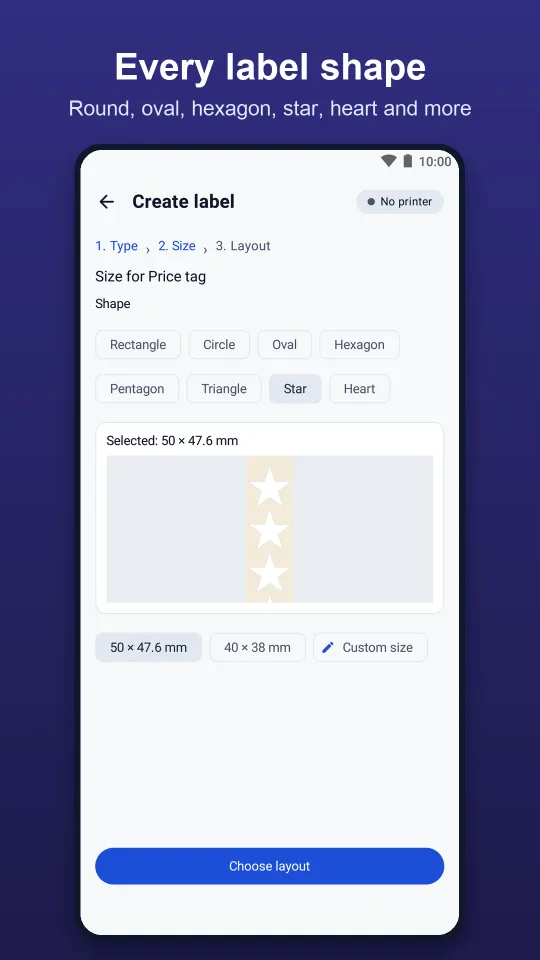
Swipe through the screens: product list, label types, Hindi and Tamil layouts, bulk printing, preview, designer, jewellery tags and label shapes.
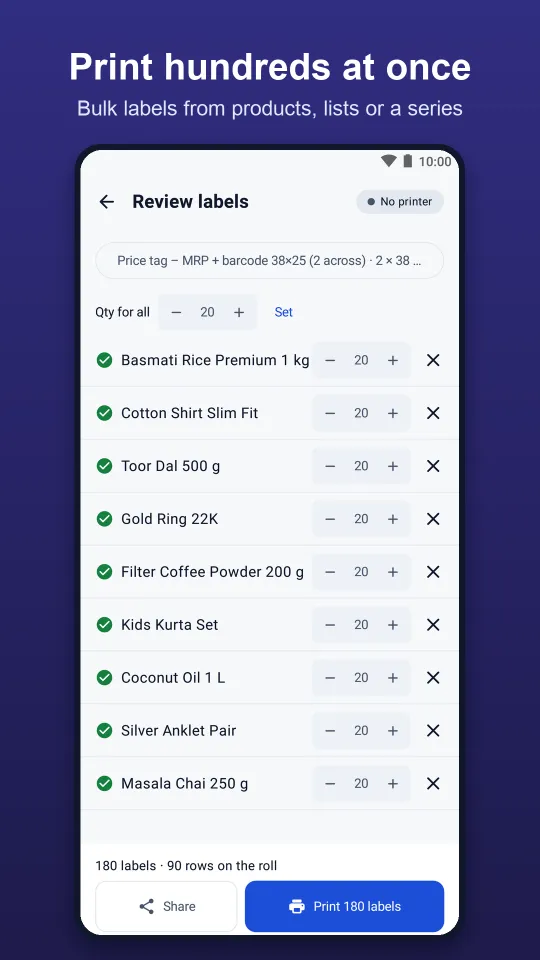
Design Your Own Labels. Print Hundreds at Once.
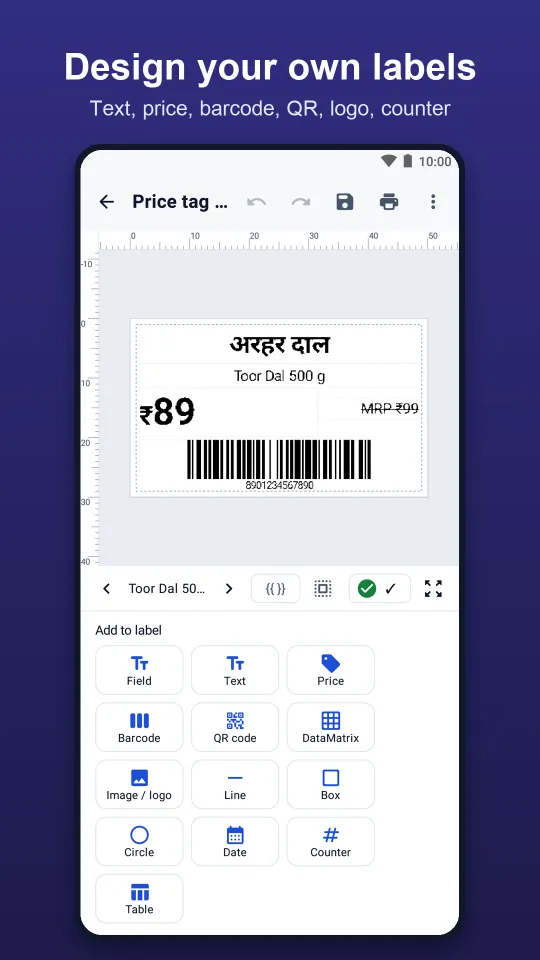
Drag-and-drop label designer
- Add text, price, barcode, QR code, logo, lines and shapes.
- Running serial numbers and dates that fill in by themselves (mfg, expiry, best-before).
- Round, oval, hexagon, star, heart and other label shapes.
- Several labels across one row for 2-up and 3-up label rolls.
- Set any label size, such as 50 × 25 mm or 50 × 30 mm, plus the gap and print darkness.
- Exact on-screen preview before anything prints, so no wasted labels.
Bulk labels from Excel or Google Sheets
- Keep your product list in the app, or import it from a CSV file.
- Select many products and set a quantity for each, then print them all in one job.
- Generate number series for tickets, tokens, raffle numbers and asset codes.
- Search or scan a product's barcode to reprint its price tag in seconds.
- Your products and labels stay on your phone. Nothing is uploaded.
Bluetooth & USB Label Printers: TSPL, ZPL, EPL, CPCL, ESC/POS
Most thermal label and barcode printers understand one of these printer languages. Label Storm speaks all five, plus Phomemo mini label printers.
| Printer language | What it is | Label Storm |
|---|---|---|
| TSPL | Command language used by many desktop barcode and label printers (TSC-style printers) | ✓ Supported |
| ZPL | Zebra Programming Language, used by Zebra and many ZPL-compatible label printers | ✓ Supported |
| EPL | Eltron Programming Language, used by older Zebra/Eltron desktop printers | ✓ Supported |
| CPCL | Language used by many mobile and portable label printers | ✓ Supported |
| ESC/POS | Receipt-printer language; also used by mini thermal printers that print labels | ✓ Supported |
| Phomemo | Phomemo mini label printers | ✓ Supported |
Connect over Bluetooth, BLE or USB
- Bluetooth Classic and Bluetooth Low Energy (BLE) label printers.
- USB label printers with an OTG cable, ideal for a fixed billing counter.
- Set label size, gap and print darkness to match the rolls you buy.
Label printer printing blank labels?
- Blank or garbled labels usually mean the wrong printer language.
- Label Storm's built-in tool finds the right language for your printer.
- Then check the label size and gap, and raise the darkness if the print is faint.
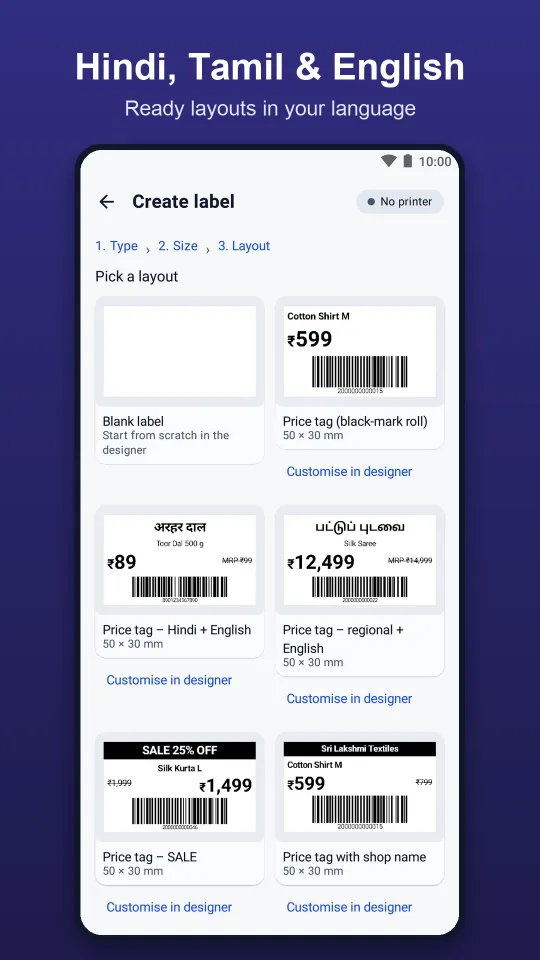
Labels in Hindi, Tamil & English
Print price tags and MRP labels in Hindi, Tamil or English with fonts that print Indian scripts correctly. The app itself is available in English, हिन्दी, தமிழ், Español, Português, Français, العربية and Bahasa Indonesia.
Label Storm vs BarTender: a Free BarTender Alternative for Shops
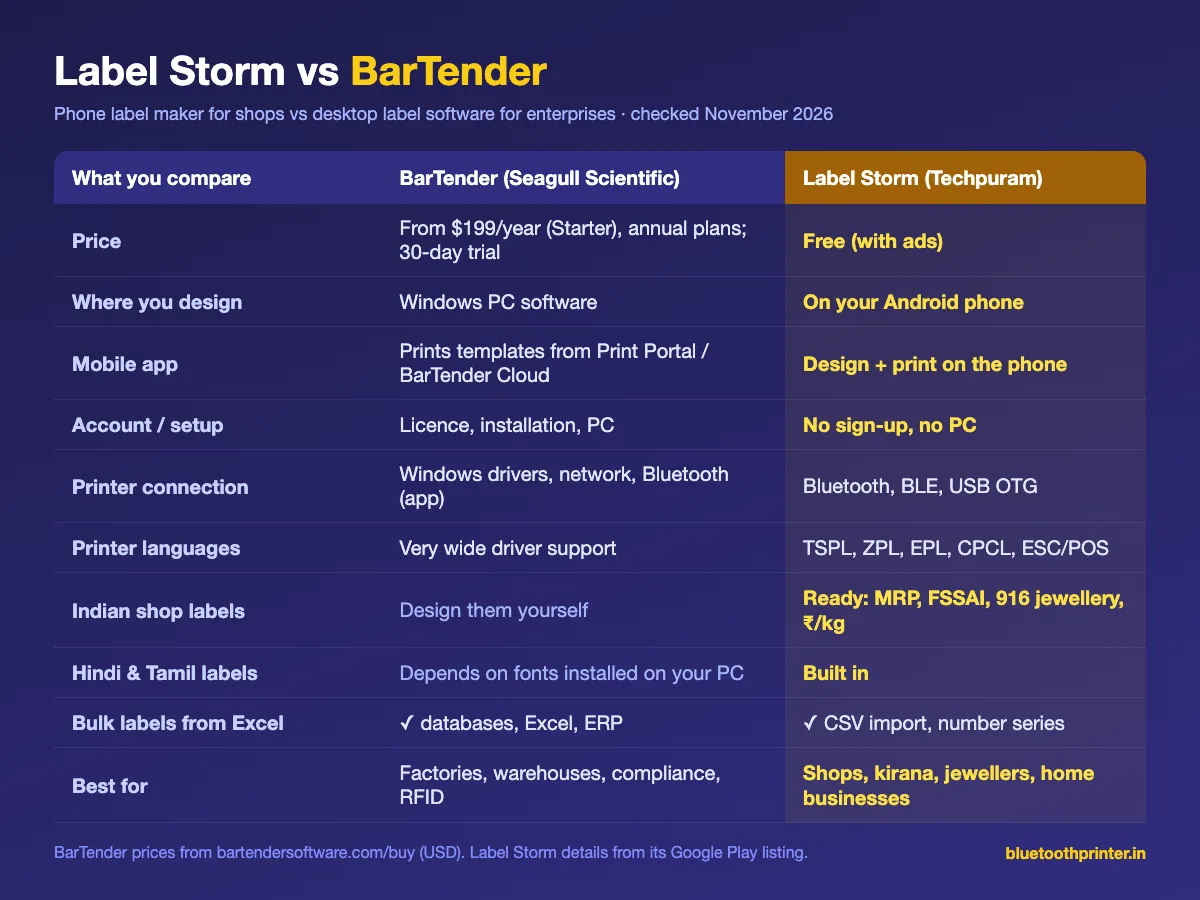
BarTender by Seagull Scientific is powerful desktop label design software for businesses. Label Storm is a free phone app for shops that just need price tags and barcode labels. Here is an honest side-by-side.
| Compare | BarTender | Label Storm |
|---|---|---|
| Price | From $199/year (Starter edition); annual plans only; 30-day trial | Free (with ads) |
| Where you design labels | Desktop software on a Windows PC | On your Android phone |
| Mobile app | Free app that prints templates managed in BarTender (Print Portal / Cloud) | Design and print on the phone itself |
| Setup | Licence, installation, PC and printer drivers | No sign-up, no account, no PC |
| Printer connection | Windows drivers and network printers; Bluetooth/IP from the mobile app | Bluetooth, BLE, USB OTG |
| Printer languages | Very wide driver support across brands | TSPL, ZPL, EPL, CPCL, ESC/POS, Phomemo |
| Ready-made Indian shop labels | Design your own | MRP + FSSAI, 916 jewellery tags, ₹/kg cards, UPI QR |
| Hindi & Tamil labels | Depends on fonts installed on your PC | Built in, with Indian-script fonts |
| Bulk printing | Databases, Excel, ERP integration | CSV import from Excel / Google Sheets, number series |
| Best for | Factories, warehouses, compliance labelling, RFID | Shops, kirana, jewellers, bakeries, home businesses |
BarTender details from bartendersoftware.com (buy page and mobile app page), checked 6 November 2026; prices are USD starting prices and change over time. Label Storm details from its Google Play listing.
Choose BarTender if…
- You run a factory, warehouse or distribution centre with many printers.
- You need ERP or database integration, compliance labels or RFID.
- You want templates managed centrally from a Windows PC or the cloud.
Choose Label Storm if…
- You run a shop and want price tags, MRP or barcode labels quickly.
- You don't want to buy a PC licence or pay a yearly fee.
- You print from a phone with a Bluetooth or USB label printer.
- You need Hindi or Tamil labels and Indian formats (MRP, FSSAI, 916).
Which Techpuram app should you use?
- Label Storm: price tags, MRP labels, barcode stickers and jewellery tags on label printers.
- Bluetooth-USB Printer Plus: receipts and invoices over Bluetooth, USB and Wi-Fi, GST invoicing and remote printing with Print Bridge.
- Simple Bluetooth Printer: free everyday receipt printing on Android and iPhone.
- Thermal Image Printer: photos, logos and images on thermal printers.
Label Storm: Frequently Asked Questions
Your Phone Is Now a Label Maker.
Price tags, MRP labels, barcodes and jewellery tags. Free, no sign-up, works with your Bluetooth or USB label printer.