Print via USB from the Bluetooth-USB thermal printer Plus application
Quick answer: To print to a USB thermal printer from Android, connect the printer with a USB OTG cable and power it on, choose Bluetooth USB Printer Plus when Android asks which app to open, allow USB access (only once), then print text, templates, images or QR codes just as you would over Bluetooth.
Bluetooth USB Printer Plus supports direct USB printing for POS and ESC/POS thermal printers.
This mode is designed for shops, billing counters, and POS setups where Bluetooth is not preferred and a stable USB connection is required.
Along with USB printing, the app provides AI-powered templates to generate ready-to-print content instantly.
USB Printer Support (ESC/POS)
- Direct USB connection to POS thermal printers
- Compatible with ESC/POS-supported USB printers
- Supports 58mm and 80mm printers
- No Bluetooth pairing required
How to Connect a USB Thermal Printer
Step 1: Connect Your POS / ESC Printer
- Connect the USB thermal printer to your Android device using:
- USB OTG cable
- Power on the printer
Step 2: App Detection
- Once the USB device is connected,
Bluetooth USB Printer Plus will automatically appear from the bottom as a system prompt
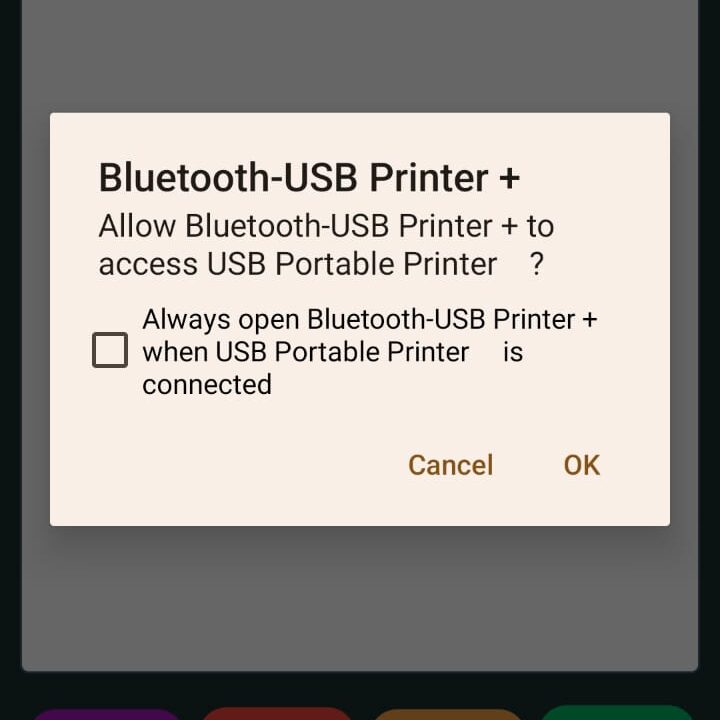
Step 3: Grant USB Permission
- Select Bluetooth USB Printer Plus
- Allow permission to access the USB device
- This permission is required only once per device
Step 4: Start Printing
- After the USB printer is selected:
- Printing works the same way as Bluetooth mode
- Use text editor, templates, images, or QR codes
- No additional configuration required
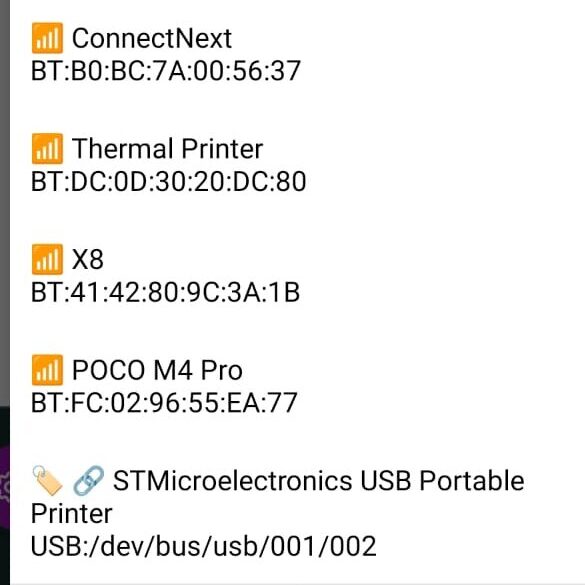
Printing Workflow (USB Mode)
- Enter or generate content
- Select USB printer (auto-detected)
- Preview content
- Print instantly
USB printing follows the same reliable pipeline as Bluetooth printing.
AI Templates (USB Printing Compatible)
AI templates work seamlessly with USB printers.
Available AI Template Types
- Price labels
- Tickets
- Weight labels
- Year or date-based formats
- Custom printable text
How AI Templates Work
- Select an AI template
- Review the example prompt
- Generate printable content using AI
- Edit if required
- Print directly via USB printer
This removes the need to manually type repetitive content.
Strict and Predictable Output
- USB printing uses the same exact layout engine
- No hidden scaling or formatting changes
- Output remains consistent across prints
Common Use Cases
- POS counters
- Retail billing
- Token and ticket printing
- Office USB printer setups
- Locations where Bluetooth is restricted
Key Advantages of USB Printing
- Stable wired connection
- Faster device detection
- No Bluetooth interference
- Ideal for continuous printing
Download Bluetooth USB Printer Plus
Google Play Store
https://play.google.com/store/apps/details?id=com.iyaltamizh.app.btprinter
Summary
Bluetooth USB Printer Plus provides a simple and reliable USB printing experience for thermal POS printers.
With plug-and-play USB detection and AI-generated print templates, it is designed for professional, repeatable printing workflows.
Comparing with Thermer? Bluetooth-USB Printer Plus adds Wi-Fi and ZPL/TSPL label printers, GST invoices and Print Bridge. Read the full Thermer vs Bluetooth-USB Printer Plus comparison.
Frequently Asked Questions
Can I connect a USB thermal printer to an Android phone?
Yes. Connect an ESC/POS USB thermal printer (58mm or 80mm) with a USB OTG cable and print from Bluetooth USB Printer Plus. No Bluetooth pairing is needed.
What cable do I need to connect a USB printer to my phone?
A USB OTG cable or adapter that matches your phone’s port (USB-C or micro-USB) on one end and the printer’s USB cable on the other.
Why does Android ask for USB permission?
Android requires you to allow an app to access a USB device. Select Bluetooth USB Printer Plus and allow access; this is needed only once per device.
Is USB printing more reliable than Bluetooth?
A USB connection is wired, so there is no pairing and no Bluetooth interference. That makes it a good fit for fixed POS counters and continuous printing.
Do AI templates work with USB printers?
Yes. AI templates for price labels, tickets, weight labels and custom text print over USB exactly as they do over Bluetooth.