Thermer vs Bluetooth-USB Printer Plus (2026): Honest Comparison & Free Alternative
Quick answer: Thermer and Bluetooth-USB Printer Plus are both free Android thermal printer apps that print receipts over Bluetooth and USB, with PDF and image printing, OCR and AI receipt templates. Choose Thermer if you also need an iPhone app. Choose Bluetooth-USB Printer Plus if you need Wi-Fi printers, ZPL/TSPL label printers, GST invoices, or remote and automatic printing through Print Bridge, REST API, webhooks and MCP. Plus’s paid upgrades are also cheaper: ₹70–₹480 versus ₹100–₹4,800.
Thermer is one of the most downloaded thermal printer apps on Google Play, and many shop owners search for Thermer Pro, Thermer APK or a Thermer alternative. Bluetooth-USB Printer Plus (listed on Google Play as Bluetooth-USB Thermal Printer+) is the advanced printing app from Techpuram, the team behind Simple Bluetooth Printer. This guide compares the two honestly, using only the features each app lists on Google Play and the App Store, so you can pick the right one for your shop.
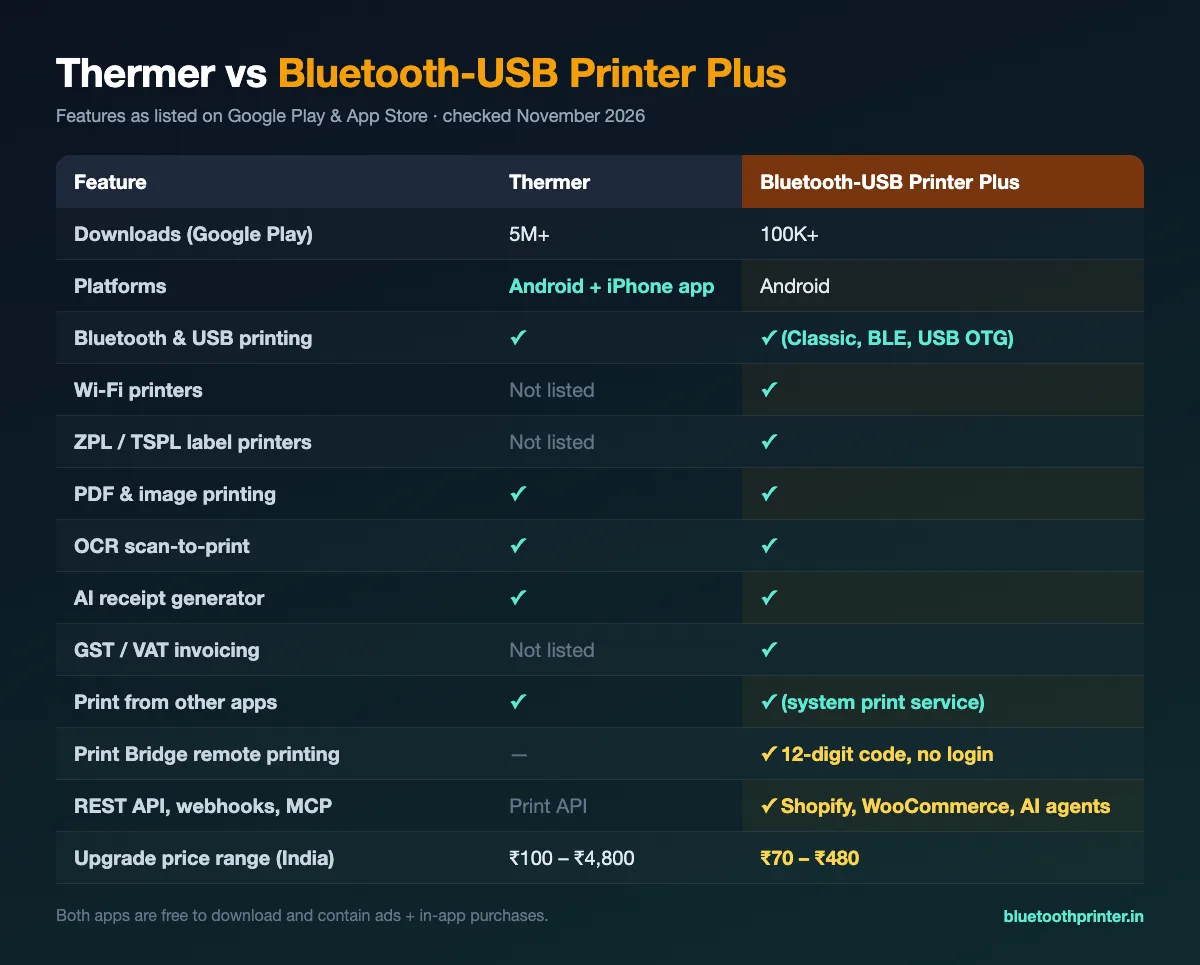
Thermer vs Bluetooth-USB Printer Plus: Comparison Table
| Feature | Thermer | Bluetooth-USB Printer Plus |
|---|---|---|
| Developer | Mate Technologies | Techpuram (India) |
| Downloads on Google Play | 5M+ | 100K+ |
| Google Play rating | 4.2★ (39,000+ ratings) | 4.2★ (675 ratings) |
| Platforms | Android + iPhone app | Android |
| Bluetooth printing | ✓ | ✓ Classic and BLE |
| USB (OTG) printing | ✓ | ✓ |
| Wi-Fi printers | Not listed | ✓ |
| ZPL / TSPL label printers | Not listed | ✓ |
| PDF and image printing | ✓ | ✓ |
| QR codes and barcodes | — | ✓ |
| OCR scan-to-print | ✓ | ✓ |
| AI receipt generator | ✓ | ✓ |
| GST / VAT invoicing | Not listed | ✓ |
| Print from other apps | ✓ (share) | ✓ (Android system print service) |
| Print Bridge (remote printing by code) | — | ✓ no login needed |
| REST API, webhooks (Shopify, WooCommerce) | Print API listed | ✓ |
| MCP server for AI agents (Claude, ChatGPT) | — | ✓ |
| Ads / in-app purchases | Yes / Yes | Yes / Yes |
| In-app purchase price range (India) | ₹100 – ₹4,800 | ₹70 – ₹480 |
What Both Apps Do Well
For everyday receipt printing on a 58mm or 80mm ESC/POS printer, both apps cover the basics:
- Bluetooth and USB printing to common 58mm and 80mm ESC/POS mini thermal printers.
- PDF, image and document printing, including printing what you share from other apps.
- OCR to scan text with the camera and print it.
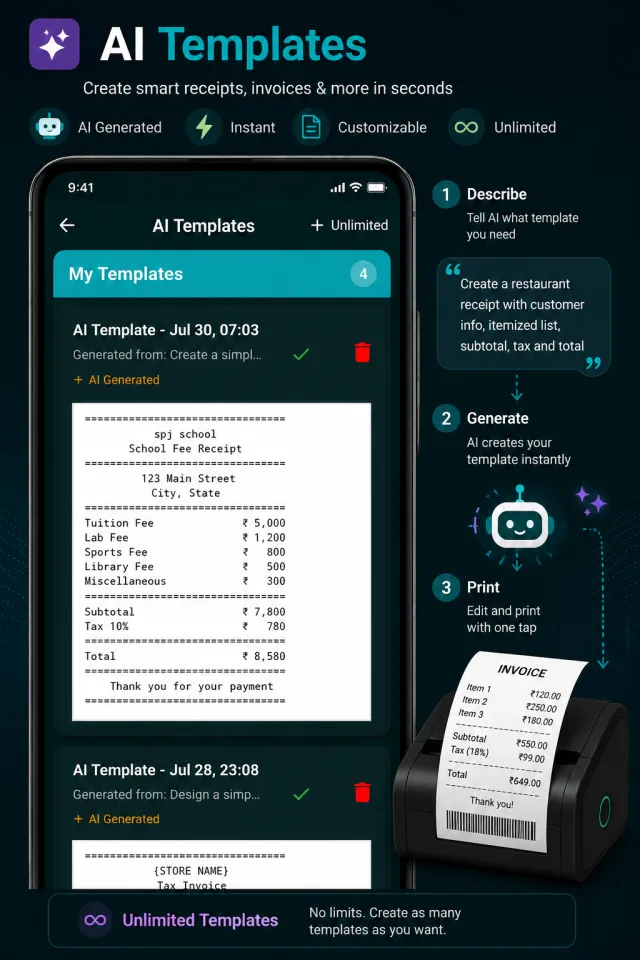
- AI receipt generation to create a bill layout from a short description.
- Multilingual printing for local-language receipts.
Thermer has a much larger user base (5M+ downloads) and an iPhone app, which matters if your staff use iPhones.
Where Bluetooth-USB Printer Plus Is Different
1. Four ways to connect: Bluetooth, BLE, USB and Wi-Fi
Plus connects to Bluetooth Classic, Bluetooth Low Energy (BLE), USB OTG and Wi-Fi thermal printers, and auto-reconnects to the last printer. If you are looking for a USB thermal printer app for Android or a Wi-Fi thermal printer app, one app handles all four.
2. Receipt printers and label printers (ZPL / TSPL)
Besides ESC/POS receipt printers, Plus prints to ZPL and TSPL label printers, so you can print shipping labels, shelf labels and price tags from the same phone.
3. GST / VAT invoicing
A built-in invoice builder with GST/VAT tax support and a product catalog that you can fill by CSV import, which helps shops in India that need tax invoices on a thermal printer.
Print Bridge: Print From Anywhere to Your Phone’s Printer
Print Bridge is the biggest difference between the two apps. It turns your phone into a print destination that other devices and services can reach. A website, an online store, your POS backend or an AI agent can send a job to the thermal printer connected to your phone, without anyone opening the app each time. It runs through printbridge.bluetoothprinter.in.
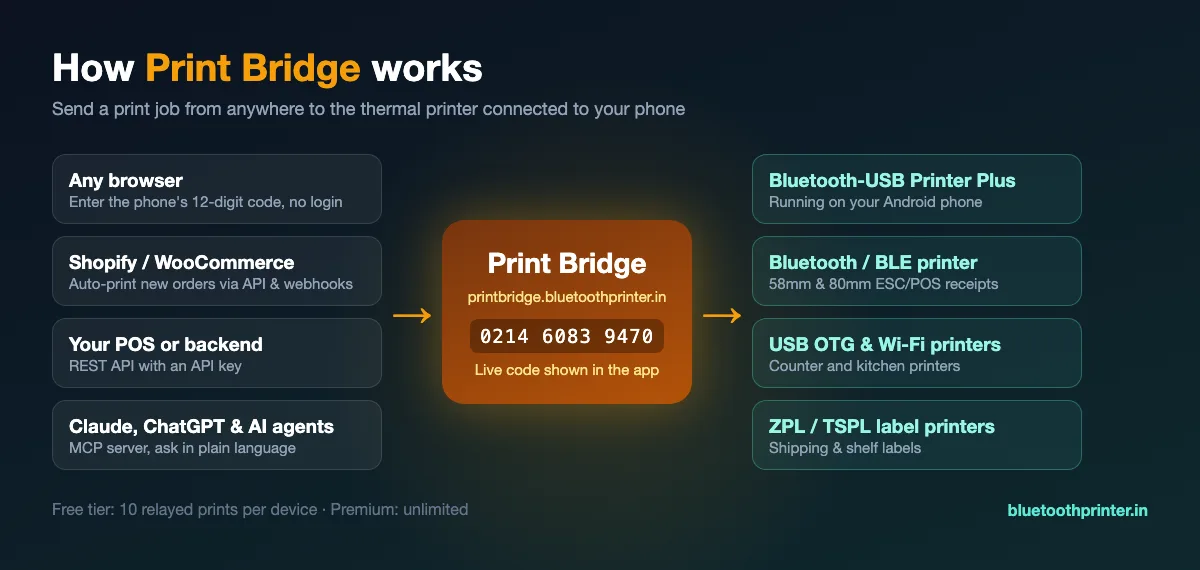
- Print From Anywhere (no account): the Print Bridge screen in the app shows a live 12-digit code. Enter it on any laptop or phone at printbridge.bluetoothprinter.in, paste your text and print.
- Order Print for Shopify and WooCommerce: pair the app once with your API key, then send orders from your store or backend with the REST API or webhooks. Receipts print automatically, even while the app is closed.
- MCP for AI agents: connect Claude Desktop, Claude Code, ChatGPT or any MCP-compatible agent to the Print Bridge MCP server and ask it to print in plain language.
- Print button on your website: a short JavaScript snippet or a
btprinterplus://link opens the app on the visitor’s phone and prints. - Android print service: print from Chrome, Gmail or Google Docs using their normal Print button.
The free tier allows 10 relayed prints per device (Print From Anywhere, Order Print and MCP); Premium removes the limit. The direct methods (print service, JavaScript, intent and deep link) are not limited.
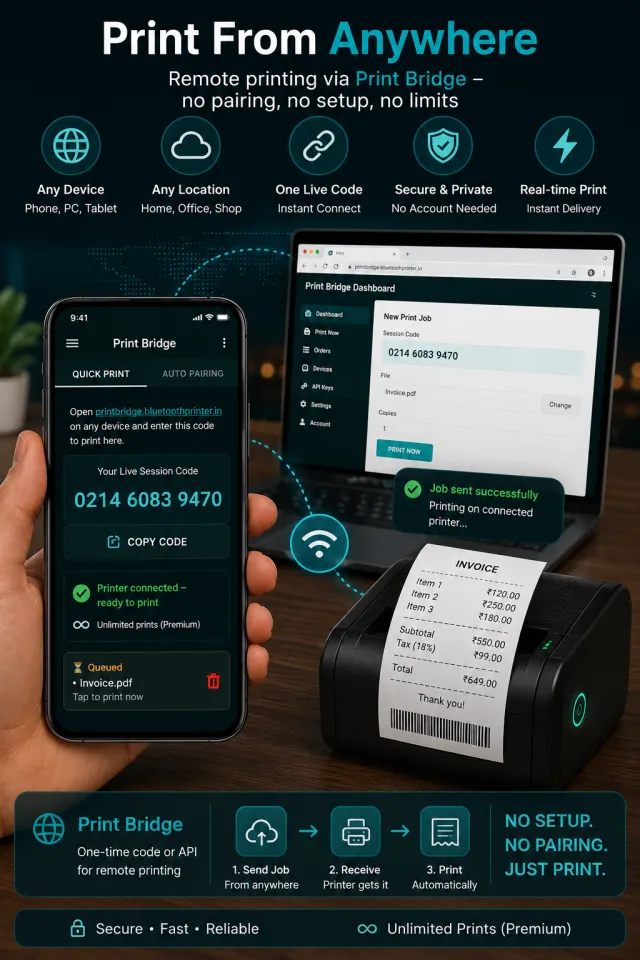
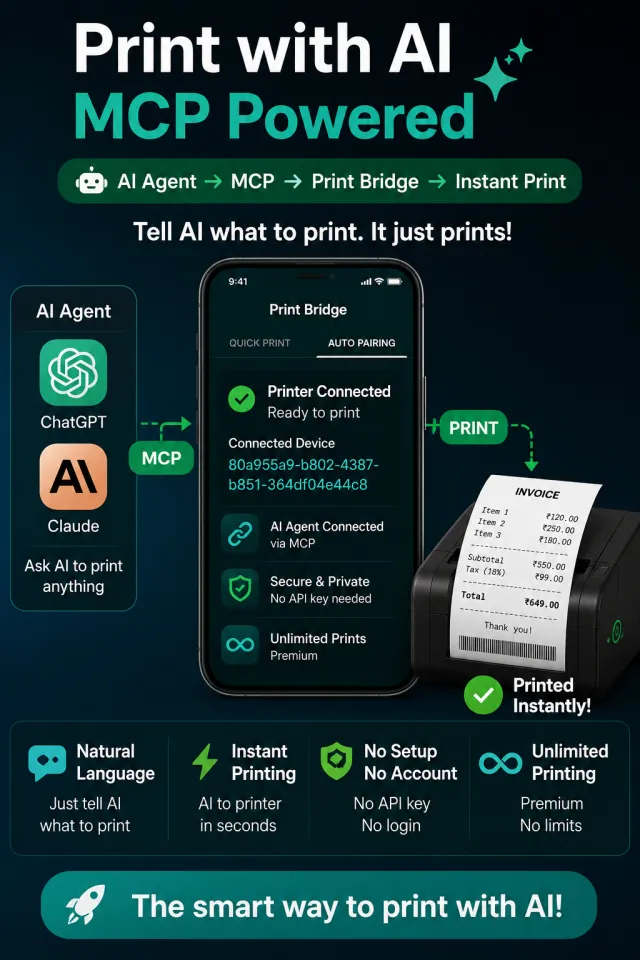
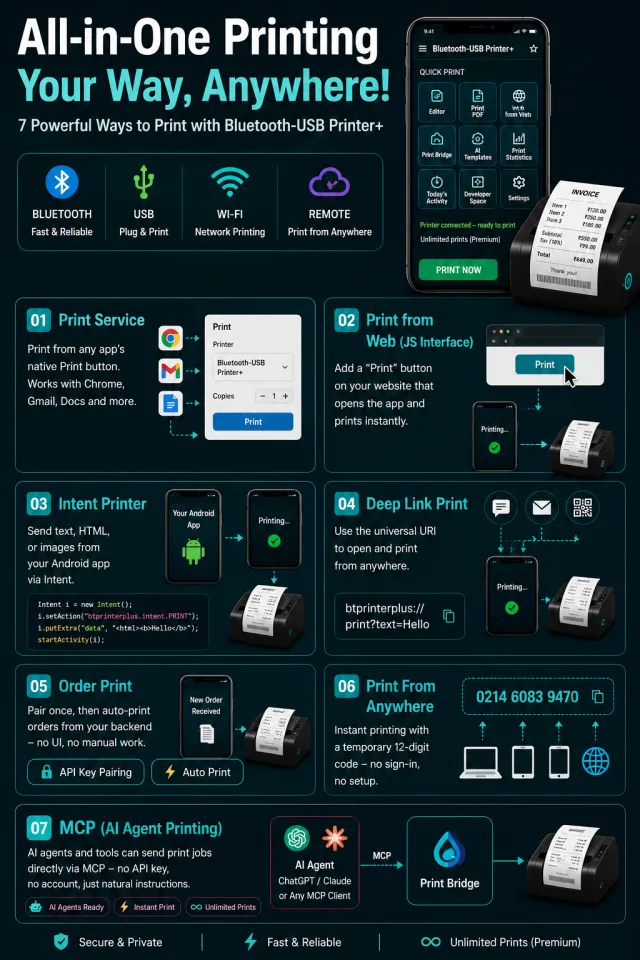
Setup guides with code examples for all seven methods: Print Bridge: 7 ways to print, including MCP for AI agents.
Looking for Thermer Pro or Thermer Mod APK?
Searches like Thermer mod APK, Thermer Pro APK and Thermer APK download are common because Thermer’s upgrades can cost up to ₹4,800. Modified APKs from unofficial websites are risky:
- They can contain malware or adware that reads your data.
- They cannot update from Google Play, so printing can break after an Android update.
- You get no support, and your saved receipts and templates can be lost.
A safer option is an official app with a lower upgrade price. Bluetooth-USB Printer Plus is free on Google Play and its in-app purchases are listed from ₹70 to ₹480. If you only need simple Bluetooth receipts, Simple Bluetooth Printer is free on Android and iPhone.
Which One Should You Choose?
Choose Thermer if:
- You need the same app on iPhone and Android.
- You only print basic receipts and are already happy with it.
Choose Bluetooth-USB Printer Plus if:
- You use a USB, Wi-Fi or ZPL/TSPL label printer, or a mix of printers.
- You need GST/VAT invoices from your phone.
- You want orders from Shopify, WooCommerce or your own system to print automatically.
- You want to print from a laptop, website or AI agent through Print Bridge.
- You want lower-cost upgrades instead of a mod APK.
How to Switch From Thermer to Bluetooth-USB Printer Plus
- Install Bluetooth-USB Printer Plus. Download Bluetooth-USB Thermal Printer+ (Bluetooth-USB Printer Plus) free from Google Play on your Android phone.
- Connect your printer. Open the app and choose Bluetooth, BLE, USB (with an OTG cable) or Wi-Fi, then select your thermal printer. Printers already paired with Thermer work with Plus too.
- Recreate your receipt layout. Templates do not transfer between apps, so rebuild your bill with a ready-made template or describe it to the AI template generator. You can also share a PDF or image from another app.
- Print a test receipt. Print a short test to check the paper width (58mm or 80mm) and alignment, then save the template for daily use.
Frequently Asked Questions
Is Bluetooth-USB Printer Plus a good alternative to Thermer?
Yes, for Android users. Bluetooth-USB Printer Plus covers the same core features as Thermer (Bluetooth and USB printing, PDF and image printing, OCR, AI receipts and printing from other apps) and adds Wi-Fi printers, ZPL/TSPL label printers, GST/VAT invoicing and Print Bridge remote printing. Its paid upgrades are listed at ₹70–₹480, compared with ₹100–₹4,800 for Thermer. If you need an iPhone app, Thermer is the better fit.
Is Thermer free?
Thermer is free to download, but its Google Play listing shows ads and in-app purchases from ₹100 to ₹4,800. Bluetooth-USB Printer Plus is also free with ads and in-app purchases, listed from ₹70 to ₹480.
Is Thermer mod APK or Thermer Pro APK safe?
No. Modified APKs from unofficial sites can contain malware, cannot be updated from Google Play and may stop working at any time. Use the official app from Google Play, or a lower-cost official alternative such as Bluetooth-USB Printer Plus.
Is there a Thermer app for iPhone?
Yes. Thermer’s developer, Mate Technologies, publishes an iPhone app on the App Store. Bluetooth-USB Printer Plus is Android only; iPhone users who want a Techpuram app can use Simple Bluetooth Printer, which is on both Android and iPhone.
Which Android app can print to a USB thermal printer?
Both Thermer and Bluetooth-USB Printer Plus support USB thermal printers through a USB OTG cable. Bluetooth-USB Printer Plus also supports Bluetooth Classic, Bluetooth Low Energy (BLE) and Wi-Fi printers in the same app.
Which app supports Wi-Fi and ZPL/TSPL label printers?
Bluetooth-USB Printer Plus lists Wi-Fi thermal printers and ZPL/TSPL label printers alongside ESC/POS receipt printers. Thermer’s Google Play listing does not mention Wi-Fi or ZPL/TSPL support.
What is Print Bridge?
Print Bridge is a free relay service built into Bluetooth-USB Printer Plus. A website, an online store such as Shopify or WooCommerce, your own backend, or an AI agent like Claude or ChatGPT can send a print job to the printer connected to your phone. The simplest method uses a 12-digit code shown in the app and needs no account.
Can I auto-print Shopify or WooCommerce orders on a thermal printer from my phone?
Yes, with Bluetooth-USB Printer Plus. Pair the app once with your Print Bridge API key, then send orders from your store or backend using the REST API or webhooks, and receipts print automatically even while the app is closed. The free tier allows 10 relayed prints per device; Premium removes the limit.
Download Bluetooth-USB Printer Plus
Get Bluetooth-USB Thermal Printer+ free on Google Play →
More: Bluetooth-USB Printer Plus features · How to print via USB · Best free thermal printer apps for Android · RawBT alternative · Alternatif Thermer (Bahasa Indonesia) · Versi Bahasa Indonesia