Print via USB from the Bluetooth-USB thermal printer Plus application
Bluetooth USB Printer Plus supports direct USB printing for POS and ESC/POS thermal printers.
This mode is designed for shops, billing counters, and POS setups where Bluetooth is not preferred and a stable USB connection is required.
Along with USB printing, the app provides AI-powered templates to generate ready-to-print content instantly.
USB Printer Support (ESC/POS)
- Direct USB connection to POS thermal printers
- Compatible with ESC/POS-supported USB printers
- Supports 58mm and 80mm printers
- No Bluetooth pairing required
How to Connect a USB Thermal Printer
Step 1: Connect Your POS / ESC Printer
- Connect the USB thermal printer to your Android device using:
- USB OTG cable
- Power on the printer
Step 2: App Detection
- Once the USB device is connected,
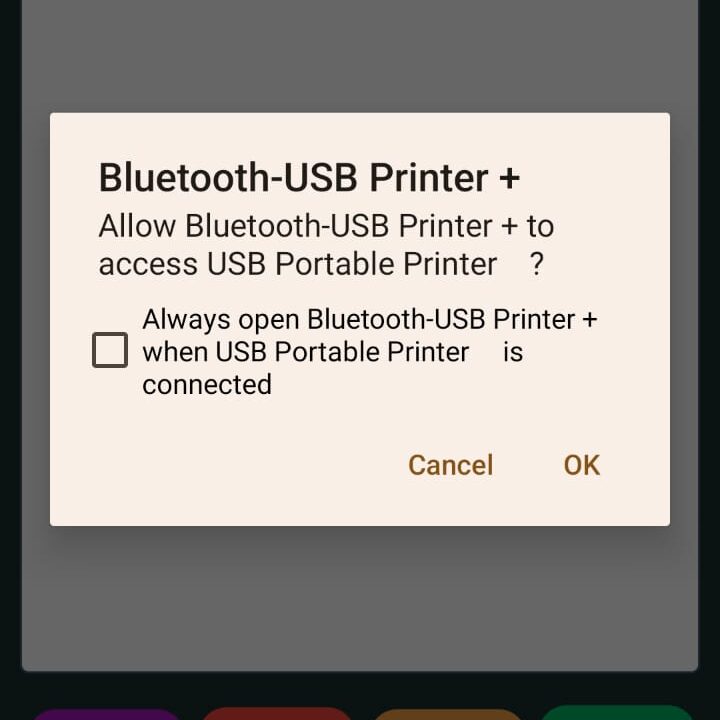
Bluetooth USB Printer Plus will automatically appear from the bottom as a system prompt
Step 3: Grant USB Permission
- Select Bluetooth USB Printer Plus
- Allow permission to access the USB device
- This permission is required only once per device
Step 4: Start Printing
- After the USB printer is selected:
- Printing works the same way as Bluetooth mode
- Use text editor, templates, images, or QR codes
- No additional configuration required
Printing Workflow (USB Mode)
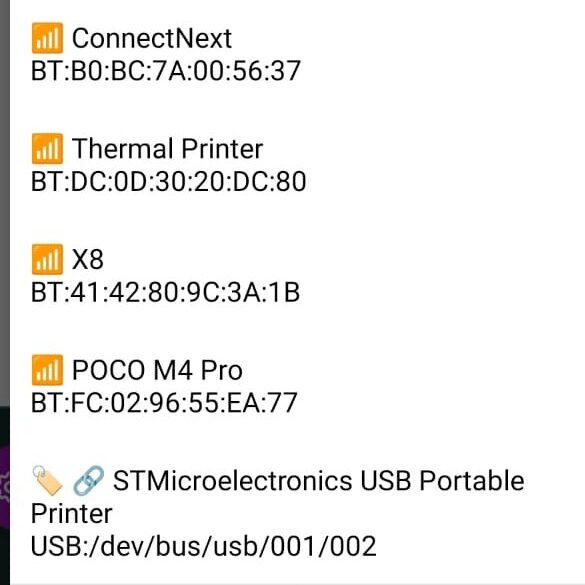
- Enter or generate content
- Select USB printer (auto-detected)
- Preview content
- Print instantly
USB printing follows the same reliable pipeline as Bluetooth printing.
AI Templates (USB Printing Compatible)
AI templates work seamlessly with USB printers.
Available AI Template Types
- Price labels
- Tickets
- Weight labels
- Year or date-based formats
- Custom printable text
How AI Templates Work
- Select an AI template
- Review the example prompt
- Generate printable content using AI
- Edit if required
- Print directly via USB printer
This removes the need to manually type repetitive content.
Strict and Predictable Output
- USB printing uses the same exact layout engine
- No hidden scaling or formatting changes
- Output remains consistent across prints
Common Use Cases
- POS counters
- Retail billing
- Token and ticket printing
- Office USB printer setups
- Locations where Bluetooth is restricted
Key Advantages of USB Printing
- Stable wired connection
- Faster device detection
- No Bluetooth interference
- Ideal for continuous printing
Download Bluetooth USB Printer Plus
Google Play Store
https://play.google.com/store/apps/details?id=com.iyaltamizh.app.btprinter
Summary
Bluetooth USB Printer Plus provides a simple and reliable USB printing experience for thermal POS printers.
With plug-and-play USB detection and AI-generated print templates, it is designed for professional, repeatable printing workflows.