Best Billing Software for Cracker & Fireworks Shops This Diwali (2026)
Best Billing Software for Cracker & Fireworks Shops This Diwali (2026)
Quick answer: Diwali billing is nothing like a normal retail day — dozens of SKUs (sparklers, flower pots, rockets, gift boxes), mixed wholesale and retail customers, and a queue that only gets longer if billing is slow. RasaBill (free Android app) is built for a fast mobile counter with barcode scan and Quick Bill mode. KoKoPos (desktop, Windows/Mac/Linux) adds a dedicated Crackers business type, bulk CSV catalog import, and retail/wholesale dual pricing for higher-volume shops.
🎆 Rockets
🪅 Flower Pots
🎁 Gift Boxes
💰 Wholesale & Retail
Cracker shops don’t bill like a grocery store on a quiet Tuesday. In the weeks before Diwali, customers buy mixed packs under real time pressure, dealers place bulk wholesale orders on the same counter as walk-in retail buyers, and a slow or confusing billing setup turns directly into a longer queue and lost sales. If your product list still lives in a notebook or an Excel sheet nobody updates, this is the season it breaks.
🎇 Why Diwali Billing Is a Different Problem
- Huge SKU counts in a short window — sparklers, flower pots, rockets, bombs, and pre-packed gift boxes, often 100+ line items that only sell for a few weeks a year.
- Retail and wholesale on the same counter — a family buying a gift box next to a dealer buying cases at a different rate, at the same billing screen.
- Extreme peak-hour pressure — the two or three evenings before Diwali see the volume of a normal month, and every extra tap at the counter compounds into a longer line.
- Everything needs a GST-ready receipt — fireworks retail in India runs on tax-compliant billing, not handwritten slips.
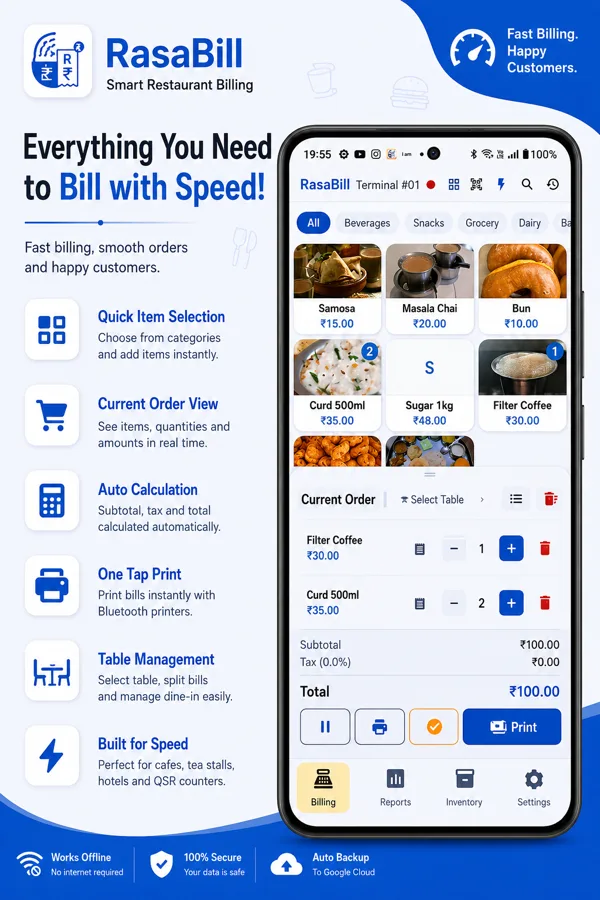
📱 RasaBill — Fast Mobile Billing for the Counter
RasaBill is a free Android app, so if your counter already runs on a phone or a cheap Android tablet, there’s nothing new to buy. For a Diwali counter, the features that matter most:
- Quick Bill mode — item number, quantity, Enter, print. Built for exactly the high-volume, low-ticket billing pattern a cracker counter needs, not a slow tap-through-categories flow.
- Barcode scan-to-add — scan a packaged product’s barcode to add it to the bill instantly; the first scan of a new item auto-adds it to inventory too.
- Categories — organize your catalog into groups like Sparklers, Rockets, and Gift Boxes so a busy counter can find items fast without scrolling a flat list.
- Bluetooth & USB thermal printing — 58mm or 80mm receipts with your logo, GST number, and footer message.
- UPI QR payments — a live QR code for the exact bill amount, so customers pay with GPay, PhonePe, or Paytm with no card machine.
- WhatsApp receipt sharing — send a digital copy of the bill straight to the customer’s phone.
- Works 100% offline — no internet needed at the counter, with data backed up automatically to Google.
RasaBill’s free tier covers unlimited billing, barcode scanning, and thermal printing — the same tier used by tea stalls, dhabas, and small retail shops across India.
🖥️ KoKoPos — Desktop POS Built for Crackers Season
KoKoPos is a desktop app for Windows, Mac, and Linux, aimed at a full-service shop already running a PC or laptop at the counter. It’s the only one of the two with a dedicated preset built specifically for this trade:
- Crackers / Fireworks business type — pick it on first launch and KoKoPos loads sample categories (Sparklers, Flower Pots, Rockets, Bombs, Gift Boxes) instead of restaurant tools you’d have to work around.
- Bulk CSV catalog import — load your entire wholesaler price list at once (name, barcode/SKU, category, retail price, wholesale price, stock, tax%), with duplicate and empty-barcode checks so mistakes get caught before the rush, not mid-queue.
- Retail and wholesale pricing in one counter — switch between retail and dealer rates on the same billing screen without maintaining two separate catalogs.
- Barcode-first Scan mode — built for high-volume counters where speed matters more than browsing a visual catalog.
- GST-ready invoices & thermal printing — tax-compliant receipts printed on any connected Bluetooth or USB thermal printer.
KoKoPos has its own step-by-step Diwali billing guide covering exactly how to set up the Crackers business type, bulk-import a price list, and get barcode discipline right before the season peaks — worth reading in full if you’re setting up from scratch. A 5-day free trial is available on all three desktop platforms.
⚖️ RasaBill or KoKoPos — Which One Fits Your Shop?
Running a single stall with a phone and a thermal printer? Start with RasaBill. Running a full shop with dealer rates and a big catalog to manage before the season? KoKoPos is the better fit — and nothing stops you from using RasaBill on a second mobile counter alongside it during peak hours.
✅ Pre-Diwali Billing Checklist
- Finish loading your full catalog (bulk CSV in KoKoPos, or added as you go in RasaBill)
- Verify your top 50 fastest-moving SKUs scan correctly
- Test your thermal printer with a real receipt, not just a preview
- Confirm your GST number and shop details are correct on the printed receipt
- Match stock quantities in the app to your actual shelf counts
- Print a simple category map for any new or temporary staff
- Run a timed mock bill of a mixed gift pack to catch any slow steps
- Stick to Quick Bill / Scan mode — don’t browse a full visual catalog under pressure
- Avoid mid-rush catalog edits unless a price is genuinely wrong
- Check low-stock alerts between rush windows, not during them
Frequently Asked Questions
Is there billing software made specifically for cracker shops?
Yes. KoKoPos has a dedicated Crackers / Fireworks business type with sample categories for sparklers, flower pots, rockets, bombs, and gift boxes. RasaBill’s Quick Bill and barcode scan-to-add modes are also well suited to the same fast, high-volume counter pattern, even without a crackers-specific preset.
Can I bill both wholesale and retail customers from the same counter?
Yes, with KoKoPos — set retail and wholesale prices per item and switch between them on the billing screen without maintaining two separate catalogs.
Do I need GST invoices for a cracker shop?
Both RasaBill and KoKoPos print GST-ready receipts with your GST number, so you’re covered whether or not GST invoicing is currently mandatory for your specific shop size.
Which is better for a small cracker stall — RasaBill or KoKoPos?
For a single counter running off a phone with mostly retail customers, RasaBill is the simpler, free option. For a larger shop with a big catalog to import and dealer/wholesale pricing to manage, KoKoPos is built for that specifically.
Can I import my existing cracker price list?
Yes, in KoKoPos — export or create a CSV with name, barcode/SKU, category, retail price, wholesale price, stock, and tax percentage, then import it from Inventory. The importer flags duplicate or empty barcodes so you catch catalog mistakes before the rush.
Get Ready Before the Rush
Diwali counters fill up fast — set up your catalog now, not the week before.