Best Billing App for Tea Stalls & Chai Shops in India (2026)
Best Billing App for Tea Stalls & Chai Shops in India (2026)
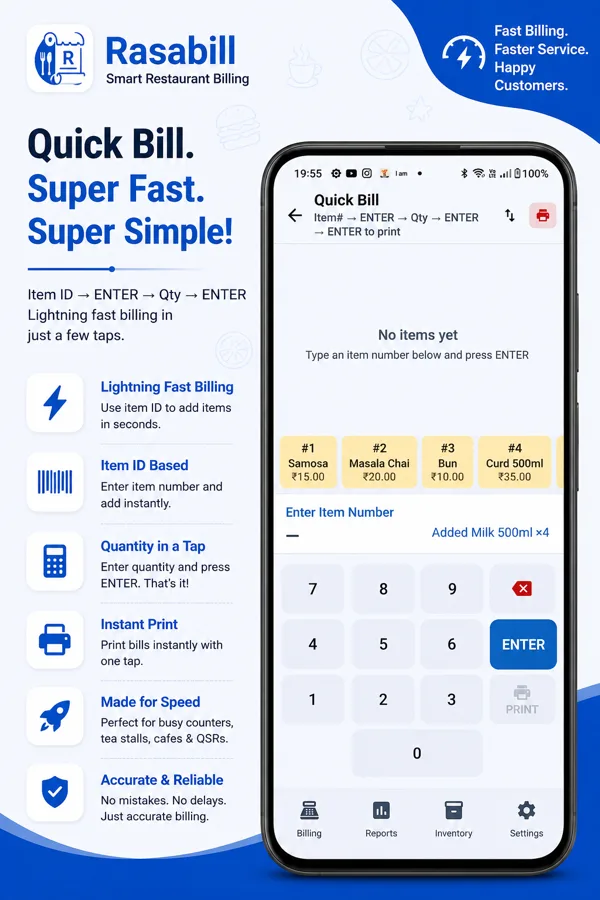
Quick answer: RasaBill is a free Android billing app built for tea stalls and chai shops, with a Quick Bill mode — type the item number, press Enter, type the quantity, press Enter — that bills a customer in seconds without tapping through a menu grid. It also supports barcode scanning for packaged items, UPI QR payments, and Bluetooth/USB thermal printing, all free.
A tea stall doesn’t bill like a restaurant. There’s no table to walk to, no multi-course order to build up over twenty minutes — it’s a cup of chai, a plate of vada, cash or UPI, next customer. Most “restaurant billing” apps are built around table service and slow down a counter that needs to move in seconds, not minutes. RasaBill has a mode built specifically for that — Quick Bill.

Why a Restaurant Billing App Slows Down a Tea Stall
A typical billing app wants you to tap a menu grid — scroll to find the item, tap it, adjust the quantity, tap again for the next item. That’s fine when a table orders eight things once. It’s the wrong workflow when the same counter serves eighty customers an hour, each buying one or two things. Every extra tap is a customer waiting a little longer, and at tea-stall volume, that adds up to a real queue.
Quick Bill: Item Number, Quantity, Print
RasaBill’s Quick Bill mode skips the menu grid entirely. Every item gets a short number — Masala Chai might be #1, Bun #2, Samosa #3. To bill a customer: type the item number, press Enter, type the quantity, press Enter, and the bill is ready to print. No scrolling, no searching, no tapping through categories. The numbers stay visible along the bottom of the screen as quick-reference tiles, so a new counter hand can learn the layout in a shift.

Set Up Your Menu Once, Bill for Months
Setting up for Quick Bill mode takes one sitting: add each item with its name, price, and category, and RasaBill assigns it a number automatically. Group items into categories — Beverages, Snacks, Bakery — so the menu stays organized even as it grows past your opening-day list. Once it’s set up, billing itself never touches the menu again.

Packaged Items Without Typing a Thing
Many tea stalls also sell packaged snacks, cold drinks, and biscuits alongside made-to-order chai. For those, RasaBill can scan the barcode instead of using an item number — point the camera at the product, and it’s added to the bill. The first time a barcode is scanned, RasaBill checks a global product database, fills in the name automatically, and remembers it for next time.
Cash and UPI, Side by Side
RasaBill generates a UPI QR code for the exact bill amount at checkout, so a customer can scan and pay with GPay, PhonePe, or Paytm without a separate card machine — useful at a counter where half the customers still pay cash and half want to scan. Every bill can print or share to WhatsApp, whichever the customer prefers.
Free for Chai Shops, Dhabas, and Tea Carts
Quick Bill mode, barcode scanning, UPI QR payments, and Bluetooth/USB thermal printing are all part of RasaBill’s free tier — the same free tier a full-service restaurant uses. A tea stall in Chennai, a dhaba on a highway, or a canteen counter in Madurai runs on the same app, at the same cost: nothing, to start.
Frequently Asked Questions
Is a tea stall too small to need a billing app?
Not really — the smaller and faster the counter, the more a per-item paper ledger or mental math breaks down under volume. RasaBill’s Quick Bill mode is built exactly for high-volume, low-ticket counters like tea stalls, not just larger restaurants.
Do I need GST invoicing for a small tea stall?
RasaBill can generate GST-compliant invoices if you need them, but it isn’t mandatory — Quick Bill mode works the same whether or not GST details are filled in, so a small stall that doesn’t need formal invoicing yet can still use it for fast, accurate billing.
Can I use RasaBill on just a phone, without a tablet or counter setup?
Yes. Quick Bill mode works the same on a phone as on a tablet — a single Android phone paired with a Bluetooth thermal printer is enough to run a tea stall counter.
What if my tea stall doesn’t use tables at all?
Table management is optional. Quick Bill mode doesn’t require assigning an order to a table — it’s built for counter service where a customer orders, pays, and moves on without sitting down.
Get Started
Download RasaBill on Google Play →
See the full RasaBill page →