RasaBill Hits 50 Daily Active Restaurants — Built for Fast POS Billing
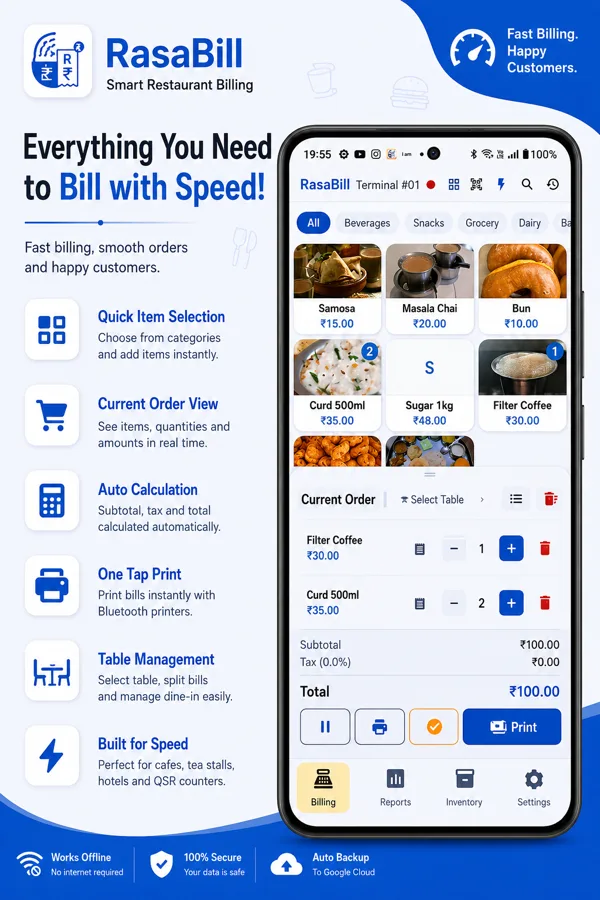
Quick answer: RasaBill, a free Android POS billing app from Techpuram, now has 50 restaurants, dhabas, and fast-food counters opening it and billing customers every single day. The draw is speed — Quick Bill mode, instant KOT printing to the kitchen, and Bluetooth thermal receipts — built for counters that can’t afford to make a customer wait while the bill is worked out.
Fifty restaurants opening RasaBill every day isn’t a huge number, and we’re not going to pretend it is. But it’s fifty real kitchens and counters that tried a paper order pad or a general invoicing app first, switched to RasaBill, and kept coming back to it daily — not once, not as a trial, but as the app they actually bill customers on. That’s the number we care about more than downloads.

What “50 Daily Active” Actually Means for a Restaurant POS App
A lot of apps report install counts or total signups — numbers that say nothing about whether anyone is actually using the thing. Daily active users is a stricter bar: it only counts a restaurant that opened RasaBill and billed on it that day. For a POS app, that’s the number that matters — a busy dinner service doesn’t run on an app nobody opens.
Why Restaurants Are Switching for Speed, Not Features
Almost every restaurant that moves to RasaBill gives the same reason: billing got faster. Not “it has more features” — faster. A table waiting for the bill, a queue building up at a quick-service counter, a kitchen that doesn’t know an order exists until someone walks over with a notepad — these are speed problems, and they’re what RasaBill is built to fix first.
Quick Bill Mode — Billing in Seconds, Not Minutes
For counters that can’t afford to tap through a menu grid for every order — tea stalls, dhabas, quick-service counters, a busy lunch rush — RasaBill has Quick Bill mode: type the item number, press Enter, type the quantity, press Enter again, and the bill is ready to print. No searching, no scrolling. It’s built for the kind of counter that bills a hundred orders in an hour.

KOT & Table Management Keep Full-Service Dining Fast Too
Quick-service isn’t the only place speed matters. For sit-down restaurants, RasaBill prints a Kitchen Order Ticket the moment an order is entered — the kitchen sees it instantly instead of whenever a server next walks past. Orders stay open against a table through multiple rounds, and a server can hold and park an in-progress order to jump to another table without losing anything. Multiple tables run at once, each billed correctly whenever the guest is actually ready to pay.

Bill, Print, and Get Paid Without Leaving the Counter
Once the order’s ready, RasaBill prints the final bill straight to a Bluetooth or USB thermal printer, shares it to the customer’s WhatsApp, or generates a UPI QR code for the exact amount so the customer pays by scanning — no card machine, no separate payment terminal to reconcile against the bill afterward. Every one of those is a step that used to mean walking to a counter, a register, or a separate device; in RasaBill it’s the same screen the order was billed on.
What’s Next
Fifty is a start, not a finish line. We’re continuing to build out RasaBill based directly on what restaurants, dhabas, canteens, and tea stalls ask for — most of what’s shipped so far (KOT printing, hold & park, Quick Bill mode, UPI QR checkout) came from exactly that kind of feedback. If there’s something slowing down your counter that RasaBill doesn’t solve yet, that’s worth telling us.
Frequently Asked Questions
Is RasaBill really free for restaurants?
Yes. Core billing, KOT printing, table management, Quick Bill mode, hold & park orders, UPI QR payments, and Bluetooth/USB thermal printing are all free — no subscription needed to run a full dine-in or quick-service counter.
How fast is billing in RasaBill compared to a paper order pad?
In Quick Bill mode, a typical order — item number, quantity, print — takes seconds rather than the time it takes to write, tally, and hand over a paper slip, and it removes the manual addition errors that come with doing the math by hand mid-rush.
Is RasaBill only for full-service restaurants?
No — it’s used just as much by dhabas, canteens, tea stalls, and quick-service counters. Quick Bill mode is specifically built for high-volume, low-ticket counters where table management isn’t needed but speed is.
Does RasaBill work without internet during a rush?
Yes. Billing, KOT printing, and receipt printing all work fully offline — an internet connection is only needed for cloud sync and UPI payment confirmation.
Related Guides
Getting Started with RasaBill — the full feature walkthrough.
KOT & Table Management for Android Restaurants — the full dine-in workflow, table by table.
Best Billing App for Tea Stalls & Chai Shops — Quick Bill mode for high-volume counters.
Try RasaBill
Download RasaBill on Google Play →
See the full RasaBill page →
Official website: RasaBill has its own site at rasabill.com — RasaBill official website, pricing, and the latest updates.