Thermal Printer Go: A Lightweight Bluetooth, USB & Wi-Fi Printing App for Any Android Phone (2026)
Thermal Printer Go: A Lightweight Bluetooth, USB & Wi-Fi Printing App for Any Android Phone (2026)
Quick answer: Thermal Printer Go is a free, minimal Android app that prints plain text to any ESC/POS-compatible thermal printer over Bluetooth, USB, or Wi-Fi. It runs on Android 7.0 and up, so it works well on older and low-RAM phones, and it isn’t tied to any one printer brand — if your printer talks ESC/POS, this app can print to it in one of 15 languages.
Most Bluetooth printer apps try to do everything — invoices, templates, image printing, order management. Thermal Printer Go does one thing on purpose: it takes whatever text you type and gets it onto paper, as fast and reliably as possible, on whatever device and whatever printer you already own. If you just need to print a note, a token number, a quick receipt, or a line of Tamil or Arabic text to a no-name thermal printer from an older phone, this is built for exactly that.
Built for Small and Older Devices Too
Thermal Printer Go targets Android 7.0 (API level 24) and up, which covers the vast majority of Android phones still in daily use — including budget and hand-me-down devices from a shop counter or a delivery rider’s pocket. The interface is intentionally simple: one text box with a live character counter, a handful of buttons, and no background services, feeds, or accounts loading in the background. On a low-RAM or older device, that simplicity is the point — there’s less app to slow the phone down.
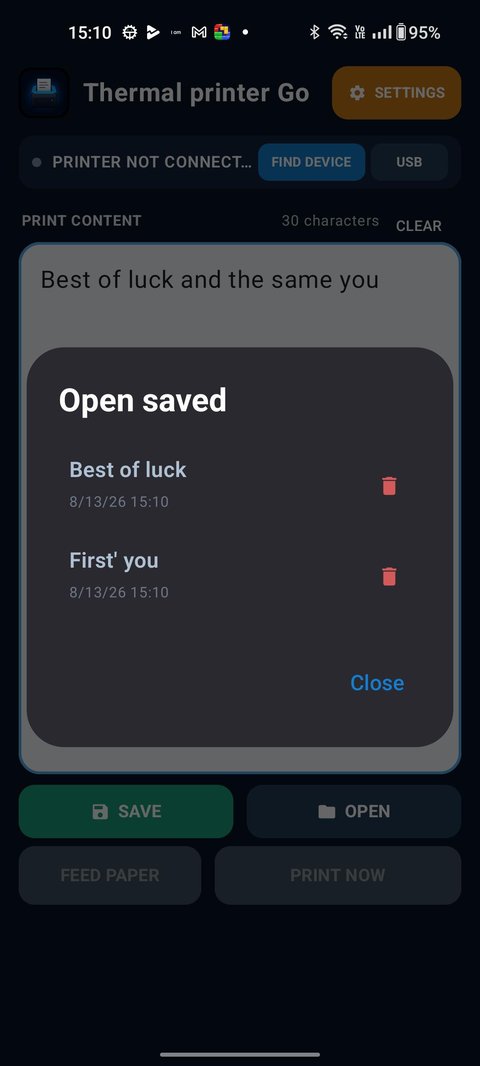
Type your text, then Save it under a name if it’s something you’ll print again — a shop token, a standard note, a repeated label — and pull it back up any time from Open. Feed Paper advances the roll without printing, and Print Now sends the job straight to your connected printer.
Works with Any Thermal Printer — Not Just One Brand
Thermal Printer Go connects over Bluetooth, USB, or Wi-Fi, and it works with any ESC/POS-compatible thermal printer — the same command standard used by the vast majority of receipt printers sold under dozens of different brand names. You’re not locked into a specific manufacturer’s app or a specific connection type.
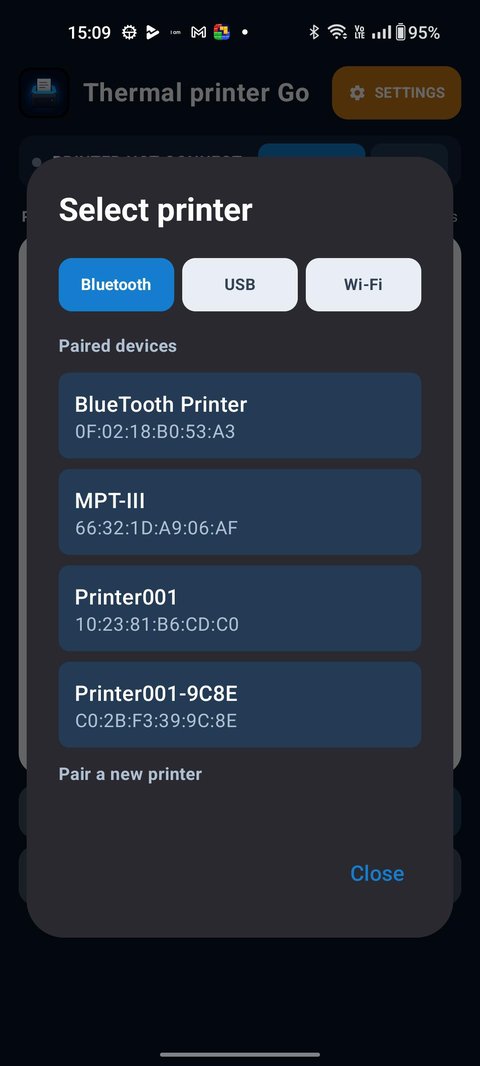
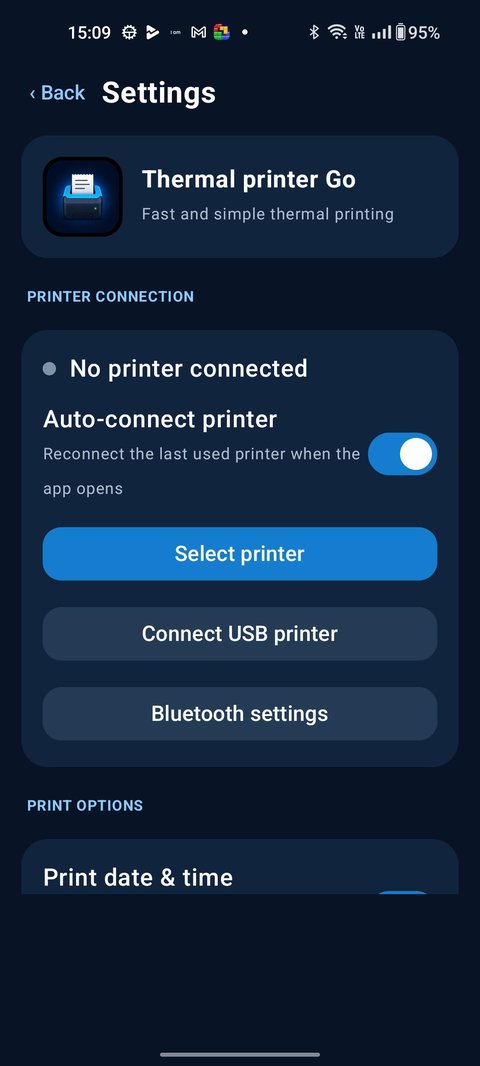
Tap Select Printer, choose the Bluetooth, USB, or Wi-Fi tab, and pick from your already-paired devices — or tap Pair a new printer to add one. Turn on Auto-connect printer in Settings and the app reconnects to the last printer you used automatically every time it opens, so you’re not re-pairing before every print.
Normal vs. Strict Print Mode — Fixes Garbled or Missing Characters
Cheap thermal printers are notorious for a specific problem: plain ESC/POS text mode leans on fonts built into the printer’s own firmware, and those built-in fonts often don’t cover every character — accented letters, symbols, or non-Latin scripts can print as boxes, blanks, or the wrong glyph entirely. Thermal Printer Go handles this with two print modes instead of one:
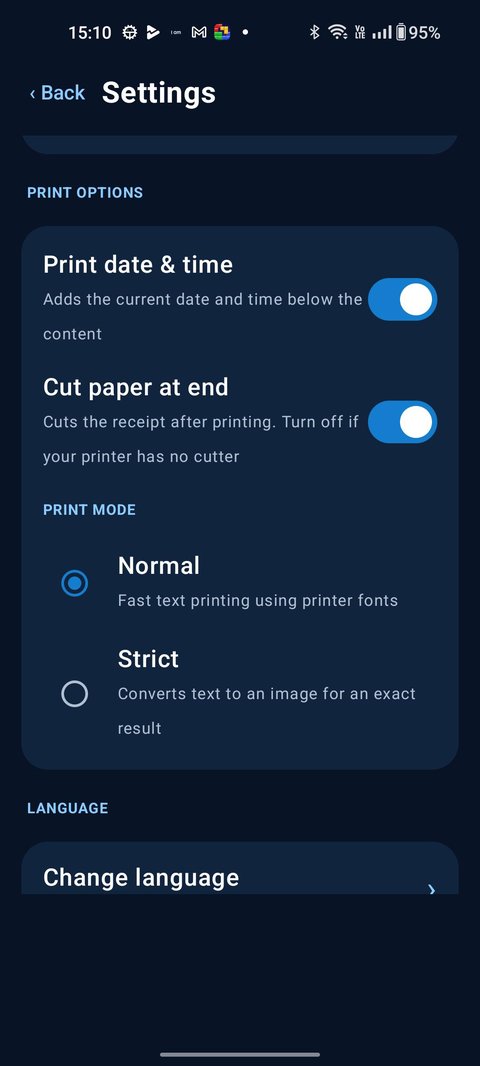
- Normal — fast text printing using the printer’s own built-in fonts. Best default for printers with good font support.
- Strict — converts the text into an image before sending it, so it prints pixel-for-pixel exactly as shown on screen, regardless of what fonts the printer itself supports. Strict mode also lets you choose the font family, font size, and print contrast — Light (Floyd–Steinberg dithering), Normal (Atkinson dithering), Dark, or Very Dark for solid black text.
You don’t have to guess which mode to use. After a print, the app asks: “Are you able to see all characters printed correctly?” If the answer is no, a one-tap “No, use Strict mode” button switches printing to image mode immediately — a built-in troubleshooting flow for exactly the kind of missing-character problem that trips up cheap thermal printers.
15 Languages, Built In
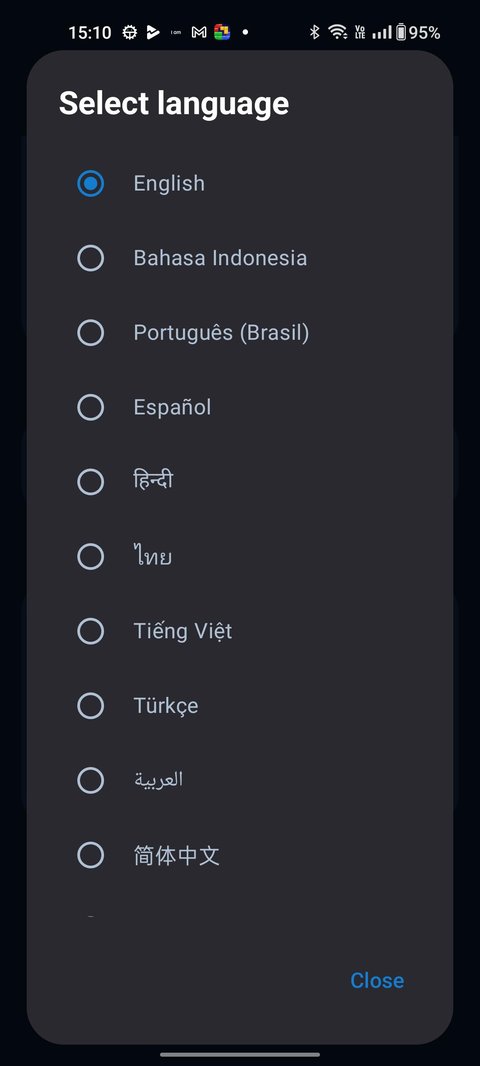
The app’s own interface — not just what you can type and print — is fully translated into 15 languages: English, Arabic, Spanish, Filipino, French, Hindi, Indonesian, Japanese, Malay, Portuguese (Brazil), Tamil, Thai, Turkish, Vietnamese, and Simplified Chinese. Switch languages any time from Settings.
Printer Connection & Print Options
The Settings screen keeps every printing preference in one place: which printer is connected (or Auto-connect printer to reconnect the last one automatically), a Print date & time toggle that adds a timestamp below your printed content, and a Cut paper at end toggle for printers with an automatic cutter — turn it off if yours doesn’t have one.
Frequently Asked Questions
Does Thermal Printer Go work on old or low-end Android phones?
Yes. It targets Android 7.0 (API 24) and up, and its interface is deliberately minimal — a text box and a few buttons, with no accounts, feeds, or background services — so it stays fast on older, low-RAM devices instead of requiring a powerful phone.
Does it work with any thermal printer, or only specific brands?
Any ESC/POS-compatible thermal printer connected over Bluetooth, USB, or Wi-Fi. The app isn’t built around one printer manufacturer.
What’s the difference between Normal and Strict print mode?
Normal mode sends plain text and lets the printer’s own built-in fonts render it — the fastest option. Strict mode converts the text into an image first, so every character prints exactly as shown regardless of what fonts the printer supports, with adjustable font, size, and contrast.
What if some characters print as boxes or blank spaces?
After each print, the app asks whether every character came out correctly. Tapping “No, use Strict mode” switches printing to image mode immediately, which fixes the missing-character and font-support issues that plain text mode can run into on cheap thermal printers.
How many languages does Thermal Printer Go support?
15: English, Arabic, Spanish, Filipino, French, Hindi, Indonesian, Japanese, Malay, Portuguese (Brazil), Tamil, Thai, Turkish, Vietnamese, and Simplified Chinese.
Is Thermal Printer Go free?
Yes, it’s free to download and use on Google Play.
Get Started
Download Thermal Printer Go on Google Play →
Browse 30+ copy-paste receipt templates →
Need richer printing — images, KOT, invoices? See Bluetooth Printer+ →