What Is Inkless Printing? How Thermal Printers Work Without Ink (Or Toner)
What Is Inkless Printing? How Thermal Printers Work Without Ink (Or Toner)
If you’ve ever run out of printer ink at the worst possible moment — mid-receipt at a busy counter, or halfway through a batch of shipping labels — inkless printing solves that problem by removing ink from the equation entirely. Thermal printers, the kind used for receipts, labels, and now photos, don’t use ink cartridges or toner at all. Here’s how that actually works, and which Techpuram app to use depending on what you’re printing.
Quick answer: Inkless (thermal) printing uses heat-sensitive paper and a heated print head instead of ink or toner. No cartridges to replace, no ink to dry out, and lower cost per print. Simple Bluetooth Printer, Bluetooth Thermal Printer Plus, and Thermal Image Printer all print this way — the difference between them is which content type each is built around.
How Inkless Printing Actually Works
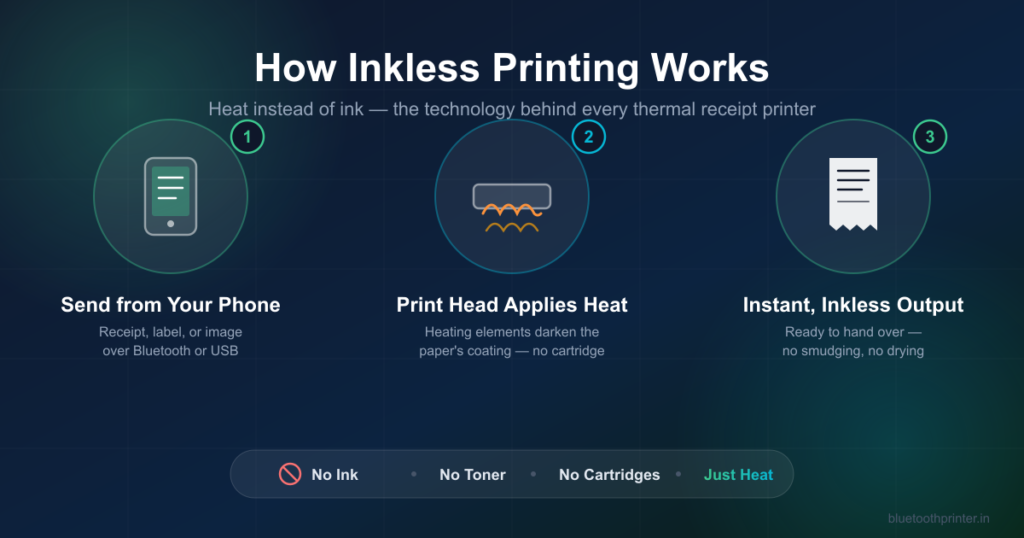
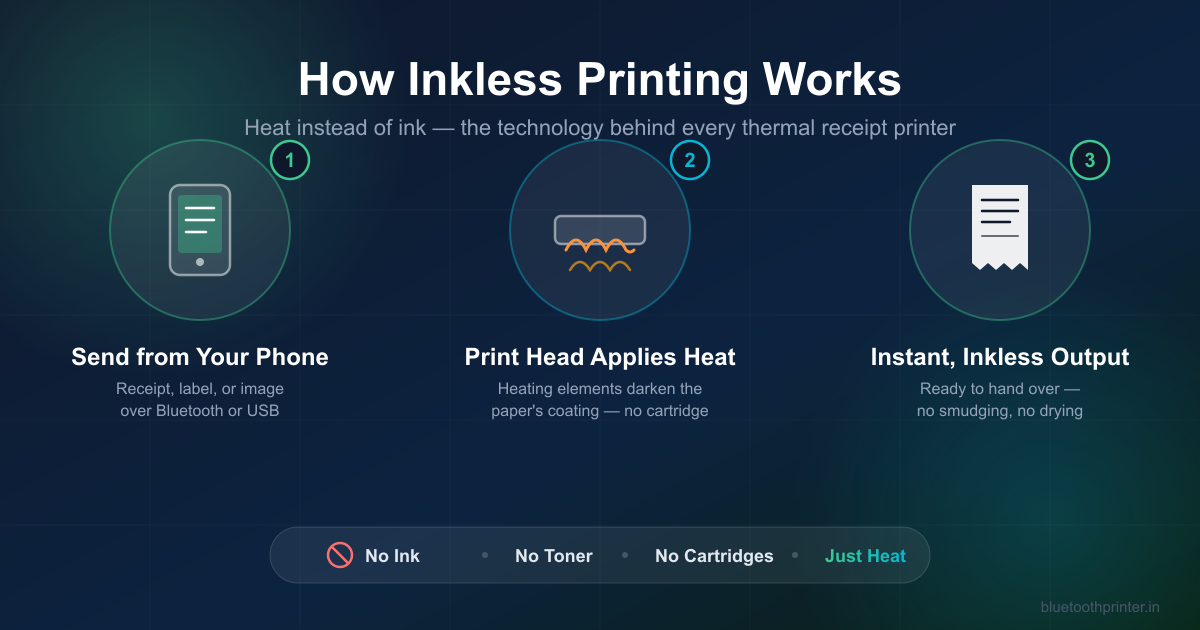
A thermal printer uses a print head lined with tiny heating elements pressed against special thermal paper. The paper is coated with a chemical layer that darkens when heated. Instead of spraying ink or fusing toner onto plain paper, the printer selectively heats points on the paper to form text, images, barcodes, or QR codes. No ink, no toner, no cartridge — just heat and chemically treated paper.
Why Inkless Printing Matters for a Shop or Small Business
- No ink to run out mid-shift. Thermal paper is the only consumable — no cartridges to stock, swap, or run dry during a busy counter rush.
- Lower cost per print. Thermal paper rolls are cheaper than ink or toner cartridges over the same volume of prints.
- Faster output. There’s no print head that needs to move back and forth spraying ink line by line — thermal printers produce a receipt or label in seconds.
- No smudging. Nothing wet touches the paper, so freshly printed receipts and labels can be handled immediately.
- Smaller, portable hardware. Without an ink delivery system, thermal printers are small enough to carry in a bag or mount at a compact counter — which is exactly why Bluetooth thermal printers paired with a phone have replaced bulky POS printers for a lot of small businesses.
Which App Should You Use?
All three Techpuram thermal printing apps use the same inkless technology — native ESC/POS commands sent over Bluetooth or USB to a thermal print head. The difference is what each one is built around.
Simple Bluetooth Printer — General Text, Receipts & Everyday Printing
The right starting point for most people. Print receipts, invoices, QR codes, barcodes, and images from Android or iPhone, with AI-generated templates and Strict Mode for exact output. Free, works fully offline, and covers both 58mm and 80mm paper.
Simple Bluetooth Printer on Google Play → · Full guide
Bluetooth Thermal Printer Plus — USB Support, OCR & Power-User Features
Built for higher-volume counters and offices. Adds direct USB thermal printer support (not just Bluetooth), OCR to convert scanned documents into printable text, PIN-protected file storage, and Auto-Reconnect plus Print History so a busy counter doesn’t need to re-pair or retype content between customers.
Bluetooth Thermal Printer Plus on Google Play →
Thermal Image Printer — Photos, Logos & Image-Heavy Printing
Purpose-built for printing images rather than text — photos, logos, drawings, and QR codes with precision dithering so images stay clear on thermal paper instead of turning into a muddy gray block. The better choice if most of what you print is visual rather than text-based receipts.
Thermal Image Printer on Google Play →
Frequently Asked Questions
Does thermal paper fade over time?
Thermal paper can fade after months of exposure to heat, direct sunlight, or friction, since the printed image is a heat reaction rather than absorbed ink. For receipts that need to last (tax records, warranties), photograph or digitally save important ones rather than relying on the physical copy indefinitely.
Is thermal (inkless) printing cheaper than inkjet or laser printing?
For receipts, labels, and short-format printing, yes — thermal paper rolls cost less per print than ink or toner cartridges, and there’s no cartridge waste from partially-used ink drying out between uses.
Can I print in color with a thermal printer?
Standard thermal printers print in black only (some specialty thermal paper supports a second color like red). For full-color printing you’d need an inkjet or laser printer — thermal printing trades color for speed, cost, and portability.
Which of the three apps should I download first?
If you’re not sure, start with Simple Bluetooth Printer — it covers receipts, images, QR codes, and barcodes in one free app. Move to Bluetooth Thermal Printer Plus if you need USB support or OCR, or Thermal Image Printer if photos and images are most of what you print.
Start Printing Without Ink
All three apps are free to download and work with any ESC/POS Bluetooth or USB thermal printer, 58mm or 80mm.
Simple Bluetooth Printer →
Bluetooth Thermal Printer Plus →
Thermal Image Printer →